
Dishwasher Leaves White Residue or Cloudy Glasses? Tell Film From Etching Before You Rewash

If your glasses or dishes come out with a chalky white haze, do not start by running the same cycle again. First test one small cloudy area with a soft cloth and a little white vinegar. If the haze clears, you are probably dealing with removable mineral or detergent film. If it does not change, the glass may be etched—a permanent surface change that another wash will not reverse.
Quick check: film or etching?
Cloudiness wipes away or clears after a brief vinegar spot test: treat it as removable film and check water hardness, detergent amount, rinse aid, and any built-in softener setting.
Cloudiness does not change: possible glass etching or glass corrosion. Stop repeatedly rewashing that item and adjust the conditions that may damage other glasses.
White residue is also visible inside the dishwasher: mineral or detergent buildup is more likely than damage to every item at once.
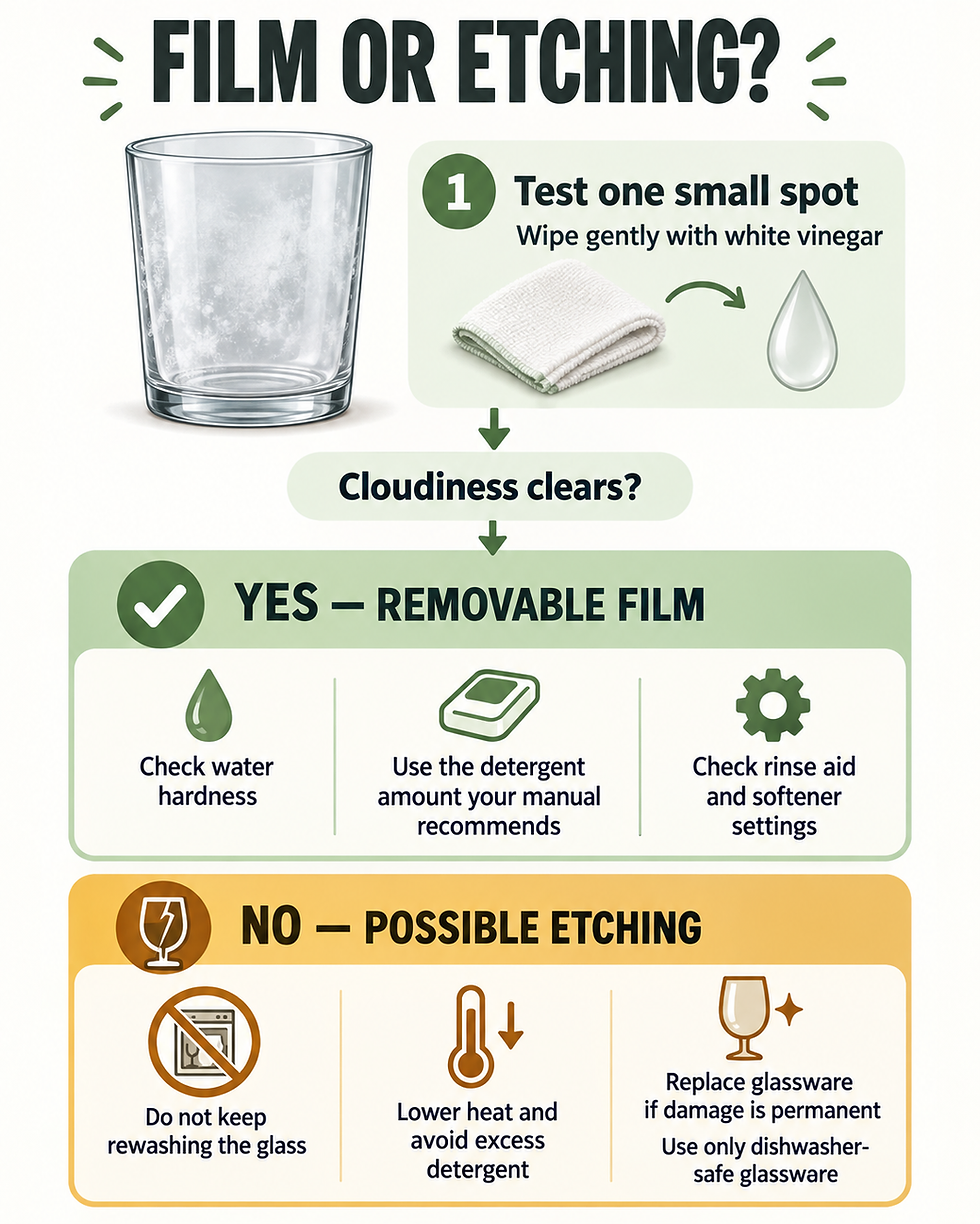
Why the one-spot test matters
Cloudy glassware can look the same at first glance even when the causes are very different. Bosch explains that milky glasses may result from removable limescale or from glass corrosion. Whirlpool owner guidance gives a practical distinction: if cloudiness clears after a short white-vinegar test, hard-water film is the likely cause. GE also separates mineral film from etching caused by wash chemistry.
Test only a small area first. Use a soft cloth, avoid abrasive pads, and check the care instructions for delicate or decorated glassware. Do not mix vinegar with chlorine bleach or a chlorine-containing cleaner.
If the haze clears: correct the source of removable film
1. Check your water hardness
Hard water contains minerals that can remain on dishes as water evaporates. Look up the hardness reported by your water utility or use a suitable test strip. If your dishwasher has a built-in water-softening system, set it to the measured hardness according to that model's manual. Bosch manuals specifically tie the softener setting and dishwasher salt use to local water hardness. Use only dishwasher salt where the manufacturer calls for it—never table salt.
2. Match detergent to the water, load, and manual
More detergent is not automatically better. Too little may leave soil or minerals behind, while too much can contribute to residue and may increase etching risk in soft water. Follow the dishwasher manual and detergent label, then make only small adjustments. Use fresh detergent made for automatic dishwashers; hand soap and laundry detergent can create excessive suds and poor washing.
3. Check rinse aid and cycle choices
Rinse aid helps water sheet off dishes and can reduce spotting and filming. Confirm the dispenser is filled and use the adjustment range described in your manual. If glasses show streaks or a metallic-looking film, Bosch troubleshooting information notes that an overly high rinse-aid setting can also be involved, so do not automatically turn it to maximum.
4. Clean buildup using model-approved directions
If film also coats the tub, use the cleaning method approved for your dishwasher. GE provides manufacturer instructions for removing white film with dishwasher cleaner or citric acid and separate guidance for a vinegar rinse. Remove metals when the manufacturer instructs you to do so, use the stated amount, and never improvise chemical combinations.
If the haze does not clear: possible etching
Etching is physical damage to the glass surface, so it normally cannot be cleaned away. It can be encouraged by a combination of unsuitable glassware, excessive detergent—especially with soft water—and overly hot or aggressive washing. The exact risk depends on the glass and dishwasher, so use the glassware and appliance care instructions rather than a universal setting.
Use only items labeled dishwasher-safe.
Measure detergent instead of adding extra for every load.
Avoid unnecessarily high-temperature or sanitizing options for delicate glassware when its care instructions do not call for them.
Use a glass, delicate, or lower-intensity program when both the dishwasher manual and glassware instructions recommend it.
Hand-wash sentimental, thin, decorated, or manufacturer-excluded glassware.
Existing etching may remain visible, but changing the wash conditions can help protect the rest of your glassware. If you are unsure whether the item is etched, compare the tested spot in good light or ask the glassware manufacturer.
Other clues that point away from simple film
Grit or food particles rather than a smooth haze: check loading, spray-arm clearance, the accessible filter, and wash performance.
Only one type or set of glasses is affected: the glass composition or dishwasher-safety rating may be the deciding factor.
A rainbow or metallic appearance: review rinse-aid dosage and the glass manufacturer's care instructions.
A sudden change after switching detergent or moving homes: compare detergent directions and local water hardness before changing appliance parts.
If dishes are still generally dirty, follow Dishwasher Not Cleaning Dishes? What to Check First Before Repair. If film is accompanied by poor drying or heavy spotting, also check Dishwasher Not Drying Dishes? 5 Checks Before You Call for Service.
When to stop and call for service
White film by itself is usually a wash-performance issue, not a reason to open the appliance. Stop using the dishwasher and arrange qualified service if it is leaking, repeatedly trips a breaker, smells hot or burnt, shows damaged wiring, or reports a persistent fault. Do not remove electrical panels, bypass safety devices, or disassemble internal pumps or wiring to solve a residue problem.

Comments