
Garbage Disposal Won’t Turn On? Check These 4 Safe Things Before You Call for Service

If your garbage disposal is completely silent, the most likely first possibilities are a tripped overload protector, a plug or switched-outlet power problem, or a failed disposal. The first safe check is simple: turn the disposal switch OFF, confirm whether the unit is plug-connected, and make sure the plug is seated. If it hums or buzzes instead of staying silent, stop switching it on—that points to a jam or stalled mechanism, which is a different troubleshooting path.
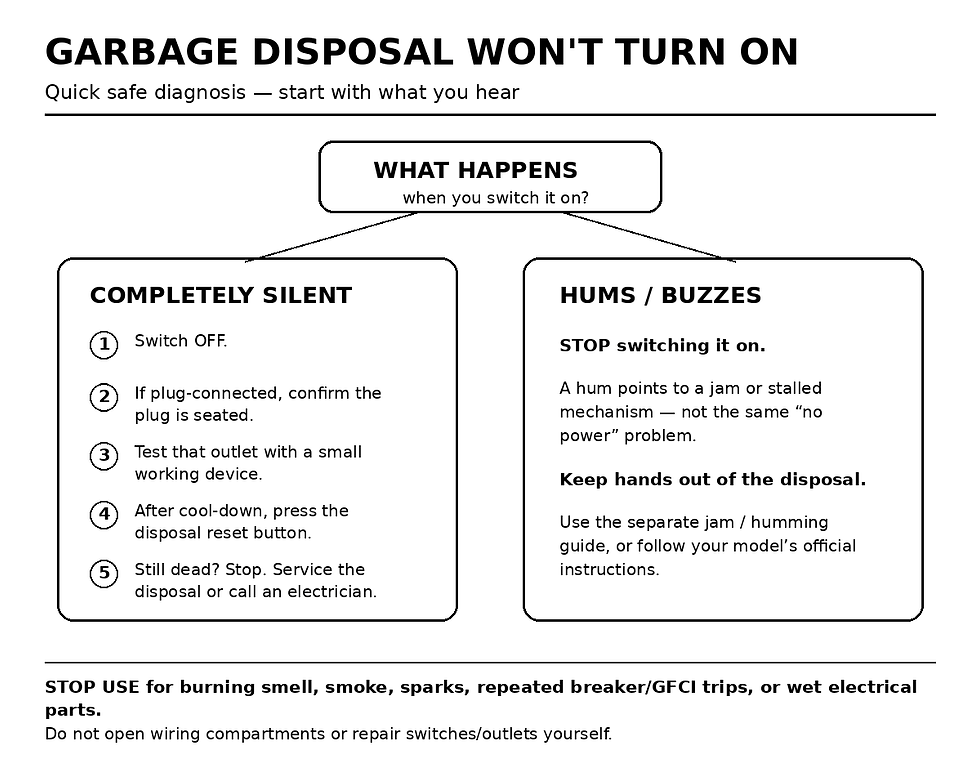
Quick Check: Silent or Humming?
Completely silent: switch OFF, check the plug if accessible, verify the outlet with a small working device, then use the model’s overload/reset procedure after any required cool-down.
Hums or buzzes: stop repeatedly switching it on. Use the separate jam/humming troubleshooting path and keep your hands out of the grinding chamber.
Burning smell, smoke, sparks, repeated breaker/GFCI trips, or wet electrical parts: stop using the disposal and contact a qualified electrician or appliance/plumbing service as appropriate.
1. If It Is Completely Silent, Start With External Power
With the wall switch OFF, look under the sink. If your disposal uses a normal plug and receptacle, confirm the plug has not been knocked loose by stored items. Do not open any wiring compartment, switch box, receptacle, or electrical panel.
For a plug-connected model, InSinkErator and Moen both recommend checking whether the outlet actually has power by unplugging the disposal and trying a small known-working device in that outlet. If the test device does not work, the problem may be with the switched outlet or home electrical system rather than the disposer itself. At that point, do not dismantle the outlet or switch—have a qualified electrician diagnose it.
2. Check the Overload / Reset Button—After the Unit Has Cooled
Garbage disposals commonly have an overload protector that shuts the motor down when it jams, overheats, or runs too long. On many InSinkErator models, the reset is a red button on the bottom of the unit. Their current guidance says to keep the switch OFF and allow the disposer to cool before resetting; some models may need up to about 20 minutes, while other models advise waiting about 10 minutes if the button will not stay in. Your model’s manual takes priority because reset design and timing vary.
3. If It Hums, Do Not Treat It Like a No-Power Problem
A humming disposal is receiving power but may be mechanically stalled. Repeatedly flipping the switch can keep stressing the motor. Turn it off and move to the dedicated jam procedure for your model instead.
Most important: never put your hand into the disposal. InSinkErator’s official jam instructions explicitly say to keep hands out and, where the model supports it, use the manufacturer’s wrench method and tongs or pliers for visible objects while the unit is safely off. Because models differ, follow the manufacturer’s exact instructions rather than improvising inside the chamber.
If yours hums but will not spin, use our Garbage Disposal Humming but Not Spinning guide instead of continuing with the no-power checks.
4. Know When the Safe Checks Are Finished
If a plug-connected disposal has a powered outlet, the reset procedure has been followed, and the unit is still completely dead, the fault may be inside the disposal. Moen’s official no-power guidance says a unit that still does not turn on after power-source and reset checks may need replacement. InSinkErator similarly directs owners to service when the external power checks pass but the unit still will not run.
Safe Homeowner Checks vs. Professional-Only Work
Safe homeowner checks | Professional-only / stop point |
|---|---|
Switch OFF; confirm an accessible plug is seated; test a plug-connected outlet with a small working device; use the external reset exactly as the manufacturer directs. | Opening wiring compartments, switch boxes, outlets, or panels; testing internal wiring; repairing a hardwired connection; continuing after smoke, sparks, burning odor, wet electrical parts, or repeated protective-device trips. |
Why the Activation Method Matters
Not every disposal starts from a standard wall switch. Moen documents wall-switch, batch-feed, fiber-optic, and air-switch activation systems. If you have a countertop air button or batch-feed stopper, your model may have a different external check. This is one reason generic advice about replacing a wall switch can be wrong—and why internal switch or wiring work should not be a DIY step.
When to Stop Using the Disposal Immediately
Burning or hot-plastic smell, smoke, or visible sparking.
Water leaking onto the plug, receptacle, wiring area, or other electrical parts.
A breaker or GFCI that trips again after one normal reset attempt.
A reset button that repeatedly trips or a unit that repeatedly overheats.
Those symptoms can indicate an electrical, moisture, or motor fault. Stop use and have the problem evaluated rather than repeatedly resetting or opening the unit.
What to Do Next
If the disposal was silent and came back after the manufacturer’s cool-down/reset procedure, monitor it during normal use. If it trips again, treat the repeat trip as a fault, not a routine reset. If it hums, switch to the jam guide. If it stays dead despite a powered outlet and correct reset procedure, contact the manufacturer’s service channel or a qualified appliance/plumbing service; use a qualified electrician when the outlet, switch, hardwired connection, or household circuit is suspect.
Browse the Garbage Disposal Troubleshooting hub for closely related symptoms.

Comments