
Garbage Disposal Humming but Not Spinning? Clear the Jam Safely Before You Reset It

Updated: Sep 5
If your garbage disposal hums but does not spin, stop flipping the switch. Manufacturer troubleshooting from InSinkErator, Whirlpool, and Moen treats humming with no grinding as a common jam symptom. Repeated attempts can trip the unit’s overload protection. The first safe check is not the reset button: turn the disposal off, then disconnect power using the manufacturer-approved method before you inspect or clear anything. If you cannot confidently disconnect power using only an accessible plug or the clearly identified breaker—without opening wiring, a junction box, or the electrical panel cover—stop and call qualified service.
Start here: switch the disposal off, then unplug it if the plug is accessible or switch off only the clearly identified breaker as your manufacturer directs. If the power source is uncertain or reaching it would require opening wiring, a junction box, or the panel cover, do not continue. Never put your hand into the disposal chamber. Use the model’s approved jam-clearing method, remove visible debris only with tongs or pliers, and reset only after the mechanism turns freely. If it still hums, trips again, smells hot or burned, smokes, sparks, or has water at electrical parts, stop using it and arrange service.
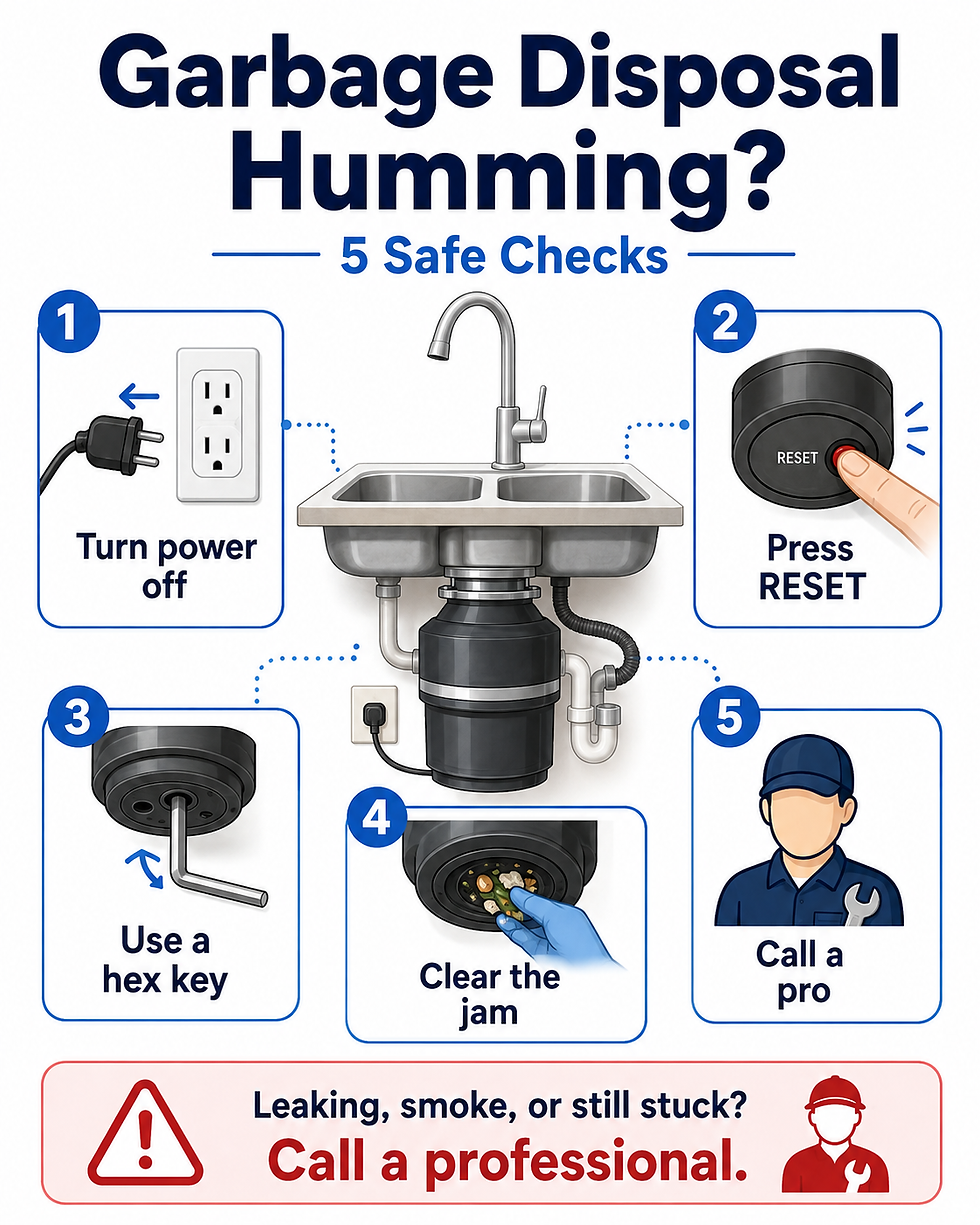
The safest troubleshooting path
Turn the disposal off. Disconnect power by unplugging the unit or switching off its circuit breaker, following the appliance manufacturer’s instructions.
Check the brand and model before using a wrench. Do not assume every disposal uses the same bottom hex socket or the same reset procedure.
If your model specifically supports an external jam wrench or hex key, work it back and forth from the bottom until the mechanism moves freely. Do not open the motor housing or wiring compartment.
With power still disconnected, use a flashlight from above. Remove only clearly visible objects with long-handled tongs or pliers. Never reach into the chamber with your hand.
Use the model-specific overload/reset procedure. Some units use a manual reset button; some newer designs use automatic overload protection and need a cooldown period.
Clear all tools from the sink, restore power, run cold water, and test briefly. If humming returns or protection trips again, stop and move to service rather than repeating the cycle.
Why a disposal can hum without spinning
A hum means the unit is being energized but the grinding mechanism is not rotating normally. Moen’s official unjamming guidance says a jam can produce only a humming sound, and repeated attempts can trip the internal breaker. InSinkErator’s official jam guide likewise covers units that are jammed, humming, stuck, or stopped.
That is why the troubleshooting order matters: clear a confirmed mechanical restriction with the manufacturer-approved external method first, then deal with the overload/reset state. Simply pressing reset while the mechanism is still stuck does not remove the obstruction.
Safe homeowner checks
1. Cut power before you touch tools
Whirlpool’s disposer guidance says to disconnect power before working on the disposer—unplug it or switch off the circuit breaker—and never put your hand inside the chamber. If you cannot confidently disconnect power without opening wiring, removing panels, or working inside an electrical box, stop here and call a qualified service professional.
2. Confirm the model’s jam-clearing method
On many InSinkErator units, the approved method uses the manufacturer’s jam wrench or a 1/4-inch Allen wrench in the center hole on the bottom of the unit. InSinkErator’s instructions say to work the wrench back and forth until it turns freely. Whirlpool also directs users to use the correct hex/Allen wrench size specified for the model.
Do not improvise if your disposal has no obvious approved external jam point. Different brands and product families can use different access methods. Check the model manual or manufacturer support page instead of forcing a tool into an opening that may not be a jam socket.
3. Remove visible debris without reaching in
With power still disconnected, shine a flashlight into the sink opening. InSinkErator and Whirlpool both direct users to remove visible objects with tongs or pliers, not hands. Never place your hand in the disposal, even if the switch is off.
4. Reset only after the jam is free
Reset behavior is model-dependent. InSinkErator’s reset guidance says many units have a red overload protector on the bottom; if it will not stay engaged, wait before trying again. InSinkErator EZ Connect models use automatic overload protection and may need a cooldown period of up to 20 minutes instead of the same manual-reset sequence.
The practical takeaway: do not keep pressing a reset button while the disposal is still mechanically stuck. Free the jam first using the model-approved method, then follow the correct reset or cooldown instructions for your unit.
5. Test once, with cold water
After all tools are removed and the area is clear, restore power, start a moderate flow of cold water, and test the disposal briefly. InSinkErator recommends cold water during grinding and continuing it for a few seconds after grinding is complete.
When the safe DIY path ends
It still hums after the mechanism moves freely and the correct reset/cooldown procedure is complete.
The breaker or overload protection trips again after one proper clearing attempt.
You smell burning or strong electrical odor, see smoke or sparks, or the unit becomes abnormally hot.
There is water leaking onto the disposal’s electrical connection, power cord, switch, outlet, or wiring area.
The jam cannot be freed with the exact external method approved for your model.
Troubleshooting would require opening the motor housing, electrical box, wiring compartment, or internal components.
At that point, leave the disposal off and contact the manufacturer, a qualified appliance/plumbing service professional, or an electrician when the symptom involves the electrical supply, switch, outlet, wiring, repeated breaker trips, sparking, or overheating. Do not bypass a reset, overload protector, interlock, or other safety device.
Common mistakes that can make the problem worse
Repeatedly flipping the switch while the disposal only hums.
Resetting before clearing the mechanical jam.
Reaching into the grinding chamber by hand.
Assuming every brand accepts a 1/4-inch hex key in the same location.
Opening electrical or motor components to chase a persistent hum.
Continuing to test after burning smell, smoke, sparks, abnormal heat, a serious leak, or repeated breaker trips.
Bottom line
A humming disposal that will not spin often belongs on the jam-and-overload troubleshooting path, but the safest fix is model-aware: disconnect power, use only the approved external jam-clearing method, remove debris with tools instead of your hands, reset or cool the unit only after it turns freely, and test once with cold water. If it still hums or shows any electrical or overheating warning sign, stop using it and get service.
Official sources
Related troubleshooting guides
If the dishwasher is also holding water, see Dishwasher Not Draining? What to Check First.
Browse more Garbage Disposals troubleshooting guides for related problems and safe checks.
Comments