

LED Bulb Glows When Off? Check the Bulb–Control Match

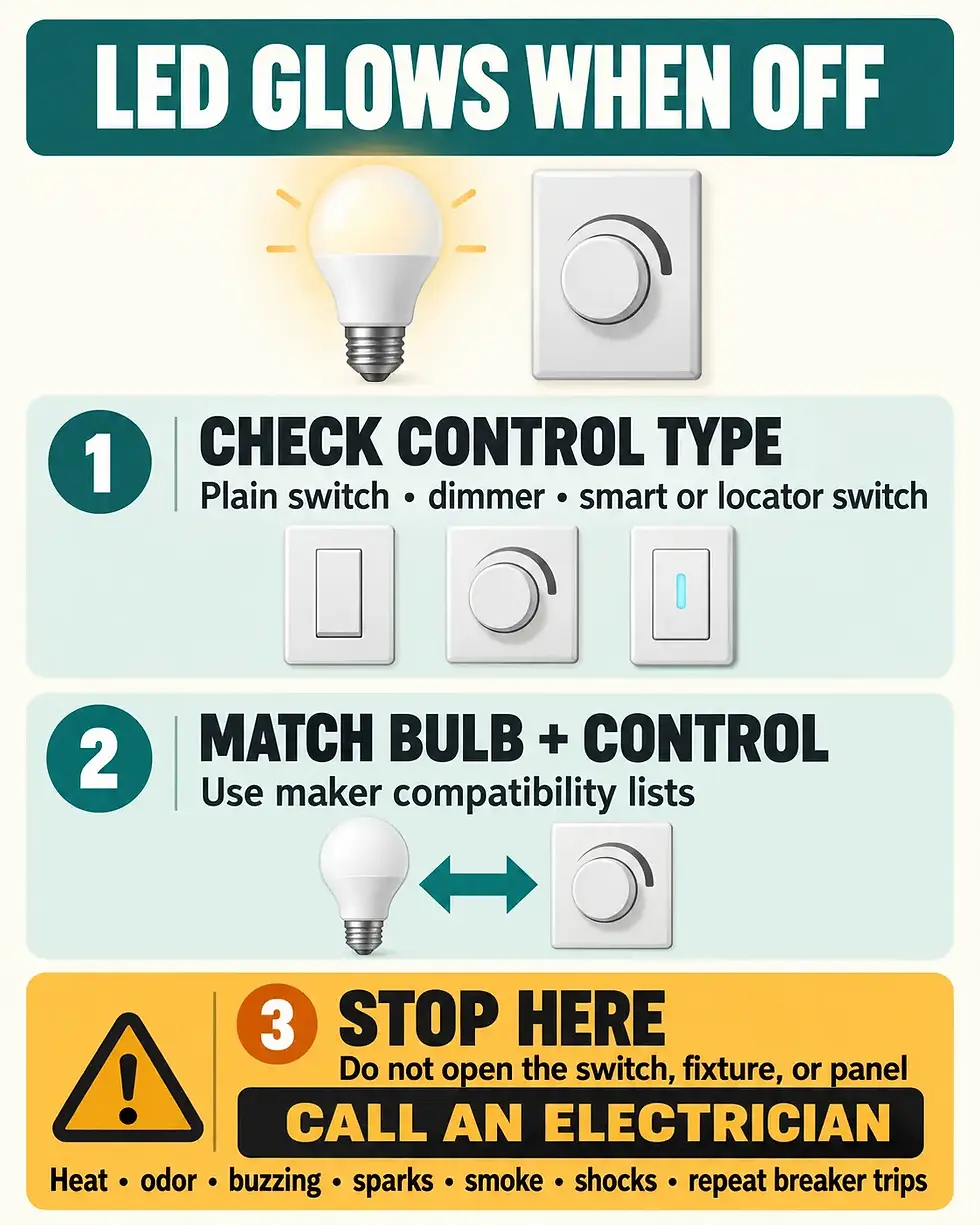
If an LED bulb stays faintly lit or flashes after you turn the control off, the bulb and the control may not be working well together. Electronic dimmers, smart switches, and locator-light switches can pass a very small current while they are off; a sensitive, low-wattage LED may respond with a glow or an occasional flash. Start with labels, settings, and manufacturer compatibility information—not the wiring.
Stop immediately if you notice heat, a burning or hot-insulation odor, buzzing or sizzling, sparks, smoke, scorch marks, a shock or tingle, or a breaker that trips repeatedly. Keep the light off and call a licensed electrician. Do not remove a wall plate, pull out a switch, open a fixture, test live wires, or add a resistor or capacitor.
Quick check: three safe decisions
Identify the normal control: plain on/off switch, dimmer, smart switch, motion control, or switch with a locator light.
Read the bulb and control model numbers only where they are already visible, then check the control maker’s LED compatibility list and instructions.
If the lamp is safely reachable and replaceable, use a compatible bulb specified for that control. Otherwise, or if the glow continues, stop and arrange professional service.
What “glowing when off” usually means
Lighting manufacturers often call a faint off-state glow “ghosting.” Lutron explains that some electronic controls—especially models that do not use a neutral connection—keep their electronics powered by allowing a tiny current through the lighting load. Leviton similarly notes that a locator light can pass a small current through the LED. A sensitive LED driver may turn that current into a dim glow or periodic flash.
That explanation is useful, but it is not a diagnosis of your home’s wiring. You cannot tell from the glow alone whether the issue is only compatibility, a control setting, a failing lamp, or a defect that needs an electrician. The safe goal is to identify the pattern and compare the exact bulb and control with their manufacturers’ instructions.
1. Describe the pattern before changing anything
Faint and steady: the bulb remains visibly lit at a low level after the control is off.
Periodic flash: the bulb is dark most of the time but blinks every few seconds or minutes.
Only one lamp affected: one bulb glows while other bulbs on the same fixture stay dark.
Only with a dimmer or smart control: the symptom disappears when a manufacturer-approved compatible bulb is used.
Accompanied by heat, odor, noise, sparks, smoke, shock, or breaker trips: stop; this is not a bulb-matching experiment.
Write down when the symptom started and whether a bulb, dimmer, smart switch, or fixture was recently changed. A photo of the bulb package and the front of the control can help a manufacturer or electrician identify the combination without opening anything.
2. Identify the control without opening it
Use only information available from the front of the device, its app, packaging, receipt, owner documentation, or a model number you already recorded during installation. Do not follow instructions that require removing the wall plate or pulling the device from the box. Even if a manufacturer support page shows internal wiring remedies, those steps are outside this homeowner check.
A plain mechanical switch should normally disconnect the controlled load. If an LED persistently glows or flashes on a plain switch—or you are not certain what kind of control is installed—keep the fixture off and ask an electrician to evaluate it. Do not assume that every off-state glow is the normal standby current described for some electronic controls.
3. Match the exact bulb and control
A bulb marked “dimmable” is not guaranteed to work well with every dimmer. ENERGY STAR advises checking the dimmer manufacturer’s recommended-bulb list, and Lutron says bulb-to-control compatibility is central to LED performance. Search with the complete bulb model and control model, not just the brand name or wattage.
Confirm the bulb is labeled dimmable if it is on a dimmer.
Check the control maker’s current compatibility tool or list for the exact lamp or fixture.
Read the control’s normal user settings. Some models let the owner disable a locator light or adjust an LED operating range without opening the device.
If the fixture uses an integrated LED module, use the fixture maker’s support information; do not disassemble the fixture or substitute parts.
For a Lutron control, start with the maker’s off-state ghosting guidance and LED compatibility tool. For a Leviton dimmer or switch, check its official support explanation and the instructions for your exact model.
4. If the bulb is replaceable, keep the test ordinary
Only consider a bulb swap when the lamp is an ordinary, user-replaceable bulb; the fixture is stable; the bulb is cool; and you can reach it safely from the floor or with a properly used step stool. Turn the normal wall control off, allow the bulb to cool, and follow the fixture and bulb instructions. Use a compatible replacement of the correct base, shape, voltage, and fixture rating.
Do not perform this test on a damaged fixture, a fixture near water, an integrated LED assembly, a recessed light that is hot or discolored, or anything requiring a ladder position you cannot use safely. Never exceed the fixture’s marked rating. If a known-compatible bulb stops the glow, the original bulb-control pairing was the likely trigger; if the symptom remains, stop there.
Do not install a “ghosting fix” inside the box
Online discussions may suggest adding a capacitor, load device, resistor, neutral connection, or different switch wiring. Those are not external checks. They can expose energized conductors, create heat, violate product instructions, or mask a fault. Even when a manufacturer offers a model-specific accessory, installation belongs to a qualified person following the exact product instructions and local requirements.
The U.S. Consumer Product Safety Commission’s home wiring guide is explicit that locating specific electrical defects and repairing them are jobs for qualified electrical professionals. The same guide treats hot or discolored electrical parts, odors, shocks, arcing, and repeated breaker operation as warning signs—not conditions to troubleshoot by trial and error.
When to call an electrician
The light is on a plain switch and continues to glow or flash when off.
The problem affects several rooms, changes when other appliances run, or began without a bulb or control change.
A compatible replacement bulb does not solve the symptom.
The switch, fixture, bulb base, or nearby surface is hot or discolored.
You hear buzzing or sizzling, smell overheating insulation, see sparks or smoke, feel a shock or tingle, or a breaker trips.
Keep the control off while waiting for help if it is safe to do so. If there is active smoke or fire, leave the area and call emergency services. Do not touch a hot device or re-energize a circuit to reproduce the symptom.
Related checks
If lights flicker while they are on, use the pattern-based checks in Lights Flickering in One Room? If the control does not operate the light at all, see Light Switch Not Working? For repeated trips, follow Circuit Breaker Keeps Tripping? and do not keep resetting it.
Sources
Lutron Support: LED Lights Glow, Flicker, or Ghost When the Lutron Dimmer Is Turned Off
Leviton Support: Why Do Lights Stay On or Glow When Dimmer Is Off?
ENERGY STAR: Light Fixtures (Downlights)—dimmer compatibility guidance
U.S. Consumer Product Safety Commission: Guide to Home Wiring Hazards

Comments